Case Study 02: Workplace Enablement
Inbox Command System
Help at the moment of work, not three weeks before it
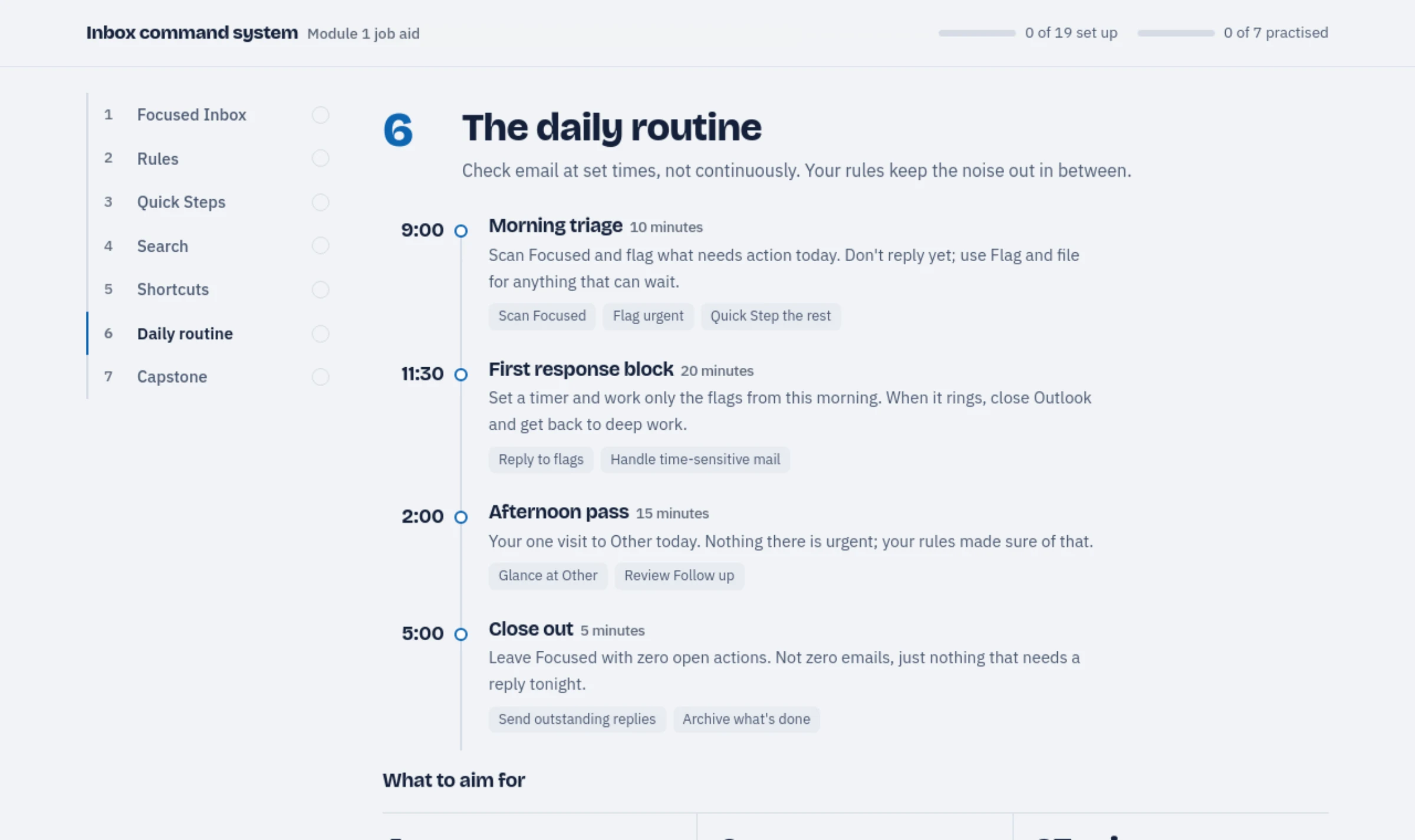 Open the job aid
01: ANALYSIS
The analysis said don't build a course.
Inbox overload is the kind of problem organisations reflexively answer with training. Working through it properly pointed somewhere else: the information needed to be available at the moment of work, not delivered in advance of it.
- Learner analysis
- Working adults who use Outlook daily and have never been shown rules, quick steps, or search operators. They will not book a session to learn an email client, and they will not remember a demonstration given three weeks before they need it. The realistic window is the two minutes they spend annoyed at their own inbox.
- Task analysis
- Procedural, not conceptual. Each task is a fixed sequence of interface actions with a verifiable end state, which makes step-level decomposition against the literal ribbon labels the right level of detail. Scope was set by frequency and payoff: three rules, four quick steps, and the search operators that replace scrolling.
- Root cause
- Gilbert’s Behavior Engineering Model puts the deficiency squarely in the environment cell: the capability exists in the software and the information does not reach the user at the point of need. Training would address a knowledge gap that is not the binding constraint. Performance support was the intervention the analysis actually supported.
- Constraints
- No administrator rights, no add-ins, and no ability to change anyone’s tenant configuration. Practice could not happen in a live mailbox without risk, which is what forced a simulated Outlook rather than a screenshot walkthrough. The job aid had to print on one sheet and survive being taped to a monitor.
Performance objectives
- Understand
- The user distinguishes which of the four quick steps applies to a given message, rather than treating them as interchangeable shortcuts.
- Apply
- Given a request to find a specific attachment, the user retrieves it with a search operator rather than by scrolling, in under thirty seconds.
- Apply
- Using the job aid, the user creates a rule that files messages from a named sender to a chosen folder, correctly on the first attempt.
- Terminal
- Thirty days on, the user’s own mailbox contains at least one working rule and one configured quick step they built without help. Adoption in the real inbox is the only outcome that counts.
Process model: ADDIE
This is the one project on the site where a linear pass was genuinely the right choice. The content is stable procedure against a fixed interface, the scope was settled in analysis, and there was no open design question that required a prototype to answer: the conditions under which ADDIE is efficient rather than ceremonial. The design frame is Gery’s performance support and Mager’s procedural specification; the simulated window exists because guided practice needs somewhere safe to fail.
02: THE PROBLEM
Software training is watched on Tuesday and needed on Thursday.
A tool walkthrough delivered as a course is consumed once, away from the work, and gone by the time the task appears. The employee then does what they always did: asks a colleague, or keeps living in a two-hundred-message inbox.
There is also a rehearsal problem. People are reluctant to experiment with rules and filters on a live mailbox they depend on, so the features that would save them the most time are the ones that go untouched.
03: THE DESIGN
Design for the moment of need, then give them somewhere safe to rehearse.
01
Reference, not narrative
Every procedure is a numbered sequence using the literal ribbon labels a user will see on screen. Scannable at the desk mid-task, with no video to scrub through.
02
A simulated window to practise in
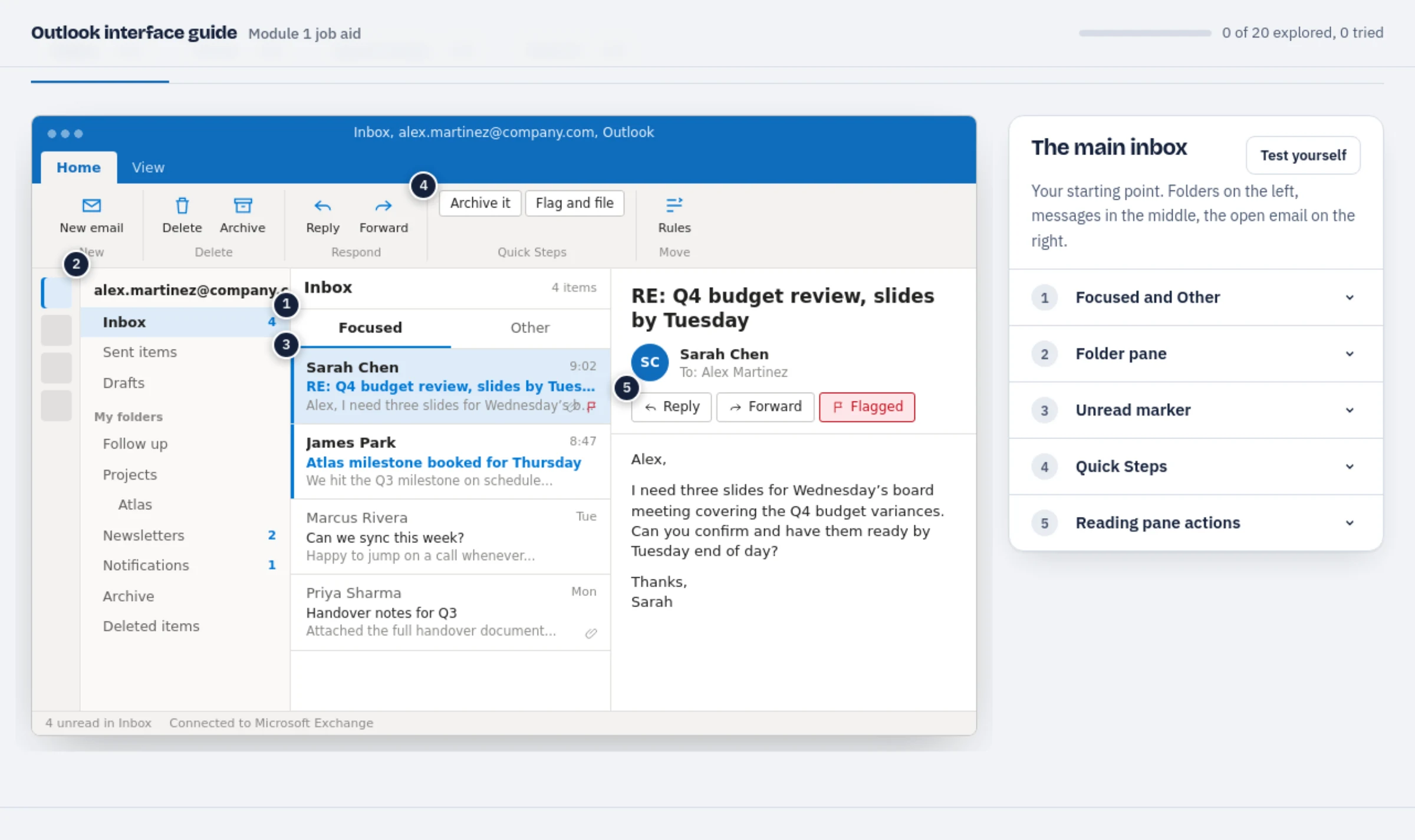
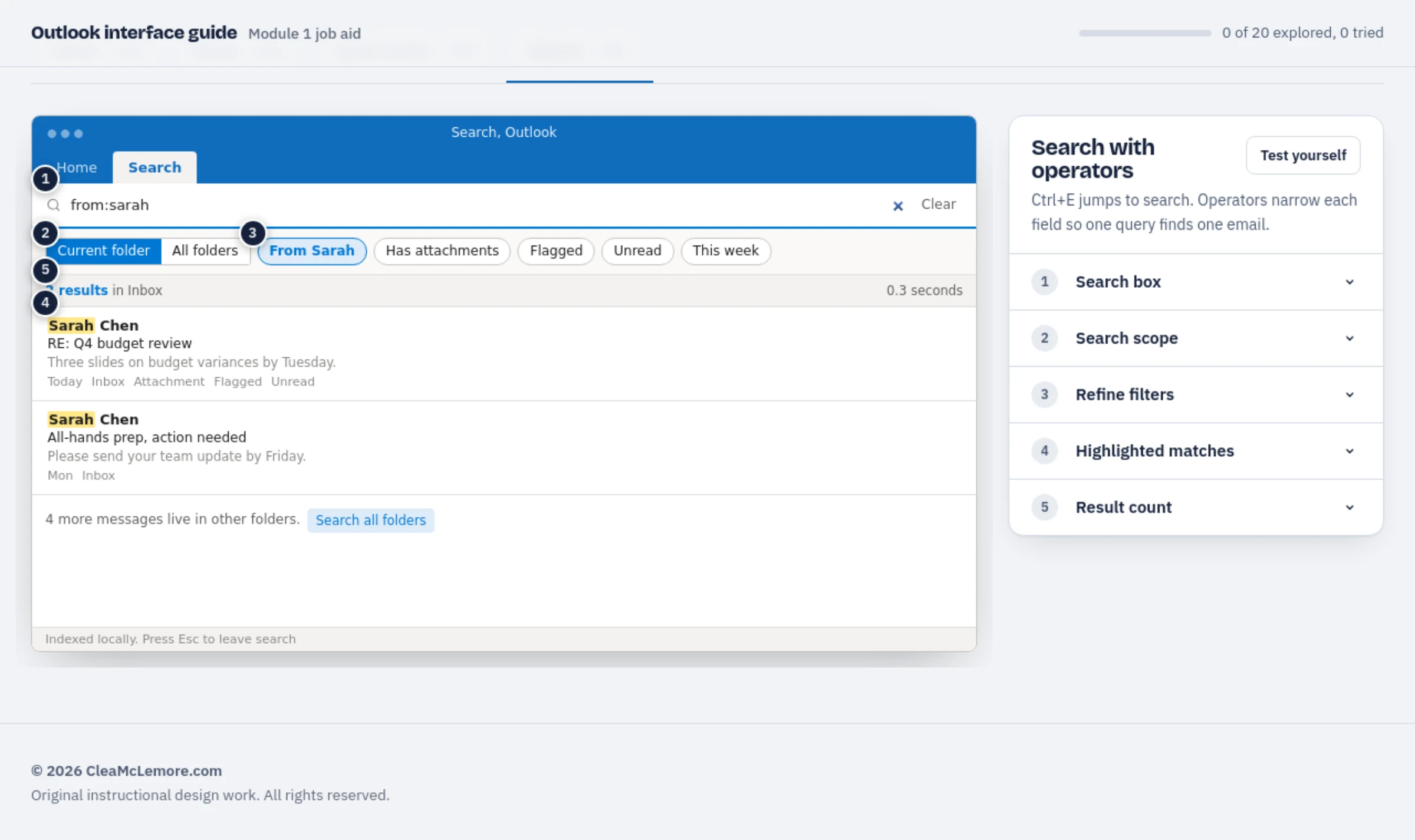
Four working screens (inbox, rules, quick steps, search) with a highlighted target and a hint at each step. Mistakes cost nothing because no real mail is involved.
03
Scoped to what pays off
Three rules, four quick steps, five tools. The scope is set by time returned to the user, not by feature coverage.
04: TWO ARTIFACTS
One system, two jobs.
The guide teaches the interface. The job aid keeps the system running after the training ends.
Interactive visual guide. A clickable Outlook stand-in: ribbon tabs, folders, quick steps and search all respond, with numbered hotspots explaining what each element does.
Desk-side job aid. Print-ready reference for the three rules, four quick steps, and search operators: with guided practice exercises built into the page.
Assessment and evaluation
The course outline carries the assessment design: knowledge checks in which every answer, right or wrong, explains why, with wrong answers naming the misconception. Its evaluation plan covers all four Kirkpatrick levels, each with a measure, a method and a pilot target: behaviour through a mailbox configuration audit at 30 and 90 days, and results through Viva Insights against a comparison group.
Accessibility, verified. All three documents pass automated WCAG 2.1 AA testing (axe-core) with zero violations in every screen and state, and every control is keyboard-operable with a visible focus indicator. Verified September 2026.
05: OUTCOME
What shipped.
Three rules that cut inbox volume by more than half, four simulated screens to rehearse in before touching live mail, and five tools taught in the order a working day actually needs them.
Built as a module of an Outlook fundamentals course and designed to outlive it; the job aid stays useful on the desk long after the session ends.
06: EVALUATION
How I would know whether it worked.
Performance support inverts the usual evaluation logic. Completion is not the goal; a user who reads two lines of the job aid, fixes their problem and closes it has succeeded, and a course-style Level 2 test would score that as a failure. This is a self-initiated portfolio piece; no organisational data has been collected.
| Level | Evidence | Status |
|---|---|---|
| 1: Reaction | Whether people keep it. Repeat opens of the job aid and whether a printed copy is still on the desk a month later say more than a rating, because the artifact only works if it is within reach. | Planned |
| 2: Learning | The guided practice in the simulated window is the assessment: completing a rule, a quick step and a search unaided, with hints tracked as evidence of where the procedure is unclear rather than as a score. | Built in |
| 3: Behaviour | The terminal objective, and the only one that matters: a thirty-day check for at least one working rule and one configured quick step in the user’s own mailbox, self-reported with a screenshot. | Planned |
| 4: Results | Help-desk tickets about finding messages and mailbox size, before and after. It is a modest claim and a checkable one, which is the right size of claim for a job aid. | Planned |
Formative testing
The test I would run is the desk test: hand someone the job aid cold, with no introduction, and watch whether they can complete a rule from it alone. Every hesitation marks a step written from the designer’s knowledge rather than the user’s screen. That is also the fastest way to find where the literal ribbon labels have drifted out of date after a Microsoft update.
The job aid is the deliverable people keep. Open it cold and see whether you could build a rule from it.